
Instagram Font Generator
Generate Instagram fonts to copy and paste.
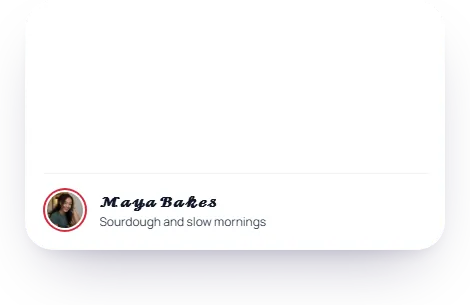
Fancy fonts
Tap any style to copy it, then paste into your bio, caption, or comment.
may show as boxes on some phones
Star a style to keep it here.
This Instagram font generator turns your text into 45 fancy styles in 11 groups that you can copy and paste into Instagram.

Instagram fonts are Unicode letters, not real fonts
Instagram has no font setting for your bio, name, captions or comments, and you can't add your own font file. What these styles do is swap each letter for a Unicode character that looks bold, script, gothic or bubbled. Most of them come from alphabets made for maths. Because they're characters and not formatting, the look survives the paste into any app.
How to change your font on Instagram
-
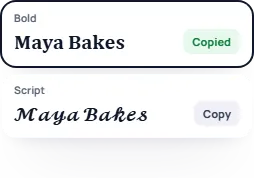
Type your text in the box and press the style you want. It's copied.
-
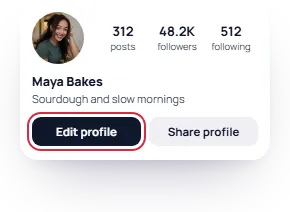
In Instagram, open your profile and press Edit profile.
-
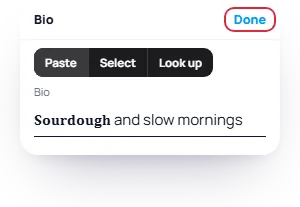
Press Bio or Name, paste, and press Done.
For a caption or a comment, paste it while you write. To go back to normal, delete the styled text and type it again. Nothing changed in a setting, so there's nothing to reset.

Which fonts show on every phone?
Bold, italic, script, small caps and monospace show correctly on almost any phone, so they're the safe picks for your name or the first line of your bio. 16 of the 45 styles are marked "may show as boxes". They use rarer characters, like squared letters, upside-down text and lines through letters, that older phones can turn into empty squares. Use those for a word, and check on a second phone.

Where you can use them
Your bio, your name, captions, comments, DMs, story and reel text, and highlight names. The story text tool has its own font menu, so these matter most where Instagram gives you no choice at all.
Your @username takes plain letters, numbers, periods and the _ sign only, so styled letters go in the name above it. Keep hashtags and @mentions plain too: a bold #food isn't the same tag as #food, and a styled @mention doesn't tag anyone.

Before you style your name
- Search. People type plain letters, and a styled name is a different string to Instagram. If you want to be found by name, keep a plain version somewhere in your name or bio.
- Screen readers. VoiceOver and TalkBack may read styled letters one by one, call them maths symbols or skip them. Style a word or a line, not the whole bio.
- Length. Your bio has 150 characters and your name 30. Sources disagree on whether Instagram counts a styled letter as 1 character or 2, so our preview counts 2 to be safe.

Mix styles and preview your bio
Mix and match lets you give each word, or each letter, its own style. Remix picks a combination for you. Star the styles you like and your last 8 copies stay in a Recently copied strip; both are saved in your browser only.
The preview shows your text as a bio, name or username on a phone-width profile, with the character counter. You can add one of 13 frames or 7 dividers before you copy.
Frequently asked
What font does Instagram use?
Bios, captions and comments show in your phone's own system font, and you can't change it. Instagram's brand typeface, Instagram Sans, is one of the fonts in the story and reel text tool.
Do these fonts work on TikTok, X or Discord?
Yes. They paste into any app that takes text. Whether every style shows depends on the phone of the person reading it.
Is this font generator free?
Yes, with no login. The conversion runs on your device, so your text is never sent to us.
Thank you for your review.
Updated